User manual and frequently asked questions Store'Inn 2 L DO250D34

With its integrated storage, you'll never misplace your accessories! Its power and large capacity will allow you to create all sorts of recipes.

- All the accessories to emulsify, beat, whisk, mince, mix, grate, or slice...easily!
- 750 W power to prepare your recipes quickly and easily
- 2 L bowl to optimise the capacity of your preparations.
- Integrated storage compartment to keep the main accessories within arm's reach.

參考編號 : DO250D34

指示及使用說明書
常見問題
The WiFi icon, especially visible from the home screen, indicates whether your product is connected or not.

WiFi icon crossed outThe product is not connected.
WiFi icon exclamation markThe product is connecting.
WiFi iconThe product is connected.
Your account, to be created from the app, allows you to benefit from additional services related to the interaction of your app with your product:
• Find the recipes saved in your notebooks and favourites directly on the robot's screen.
• Follow remotely the progress of the recipe on your product and receive recipe notifications.
• Display on your product a recipe that you have selected in the application.
Even if your product doesn't need a very fast WiFi connection to work, the received WiFi signal must still be stable.
If the screen displays a connectivity error, you can move the product closer to your box or add a WiFi repeater (see FAQ 'I don't have WiFi access in my kitchen').
If your product loses the WiFi connection during a recipe, you will be able to finish your recipe without any inconvenience.
However, the videos of that recipe will no longer be accessible until the connection is re-established.
If the WiFi connection is interrupted during an update, this cannot be completed. Your product will be able to reboot to its current version and this update will be rescheduled the next time you start it.
If your smartphone loses internet connection (WiFi or 4G) during a recipe it will have no impact on your product which will be able to execute the recipe without any problem. You will simply no longer be able to follow the progress of the recipe remotely on your smartphone and you will no longer receive notifications about the end of a step or the addition of an ingredient.
Your product can only be associated with one account.
However, any application that is connected to this account can interact with this product.
If you have a tablet and a smartphone, or if other members of your household want to interact with your product, they can simply connect their application using your account.
As soon as an update is available, your product when it connects to the WiFi will suggest you to do the update.


Some updates are priorities for security reasons and you will need to perform them before you can use your product.
Others may be delayed. You can then perform them now or later by going to your product's settings.
If an update fails, you can download it again.
If despite several attempts you are unable to install it, move the product closer to your box, the connection from your kitchen may be too weak to download it.
If the update fails even close to your box, please contact our customer service.
If your product is associated with your user account, you will be able to follow the progress of your recipe on your application.
You will also receive end-of-stage or alert notifications.
If you do not receive these notifications, please enable them in your iOS or Android settings.
To remotely send a recipe from your application to your product, simply open a recipe and click on the icon with your product.
If your product is on standby, it will open on your product as soon as it connects to Wifi.
If the product is running, it will be displayed in a few seconds if your product is not already making another recipe.
Place your device on a flat, stable surface.
To obtain an optimal connection between your device and your box, it is recommended to position your device in a place where the Wifi signal received from your box is strong. You can test the connection by positioning your smartphone at the location of your product to see if the WiFi signal received at that location is strong enough.
If the connection is interrupted (connection symbol crossed out), please bring your device and your box closer together to reestablish the connection.
The presence of the fixed connection indicator (application or product) ensures that your devices are connected.
在首次使用裝置前,請用暖肥皂水清洗所有配件(詳見使用說明書的清潔部分)。沖洗並瀝乾。
把摩打組件放在清潔乾透的平面上。
接駁電源。
處理前,應待液體的溫度下降至室溫。不要將熱燙食材放入碗內,因食材的熱力或會導致封口受損。
榨汁器、切磨盤等附件需採用較高速度,至於柑橘壓榨器、麵糰工具等附件則應使用較慢速度。
按下特強速度按鈕,即可在最強速度使用最強的動力。這是攪拌機較常用的功能,由使用者控制相關模式的操作時間。這有效避免食材過度處理。例如,可在處理結束時將水果加入蛋糕混合物,或將軟身水果混合乳酪製成沙冰。
不銹鋼刀片適用於:混合、攪拌、糊漿、製作麵包糠、粉漿、糕點和蛋糕。攪拌器附件僅用於製作糊漿(如湯、奶昔等)、果泥或蔬果蓉。切勿用於碎肉或捏製麵糰和糕點。
On the home page, drag the menu to the right and select "Stand by".
Thanks to the function "In my fridge" you can indicate the ingredients that you have at your disposal and we will suggest suitable recipes.


• You can access this feature from the home screen.
• Add one or two ingredients by typing their name in the search bar and selecting it from the suggestions.
• You can then enter the weight of the added ingredients so that we can offer you recipes for those quantities.
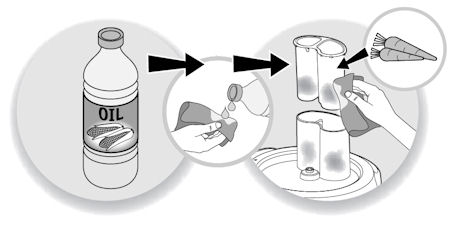
為減輕變色情況,先把抹布或紙巾浸進食油,然後擦拭染色表面,再按正常步驟清潔。
使用後立即清潔,有助避免染色。

拔掉電源。
為方便清潔,使用後請立即沖洗配件。
清洗並瀝乾配件:除摩打組件、碎肉器組件(減速器+碎肉器頂端)*、攪拌機驅動組件*和榨汁機身*(*視型號而定)外,其他配件均可放於洗碗碟機、水中或水龍頭下清洗。以濕海綿擦拭。
抹乾後,用食油塗抹刀片和碎肉器,以保持潤滑。
將數滴洗滌液加入熱水中,然後倒進攪拌碗內,蓋上裝有食物口的機蓋,攪動數次,拔掉電源並沖洗攪拌碗。
配件的刀片非常鋒利,請小心處理。
不少食物處理器配備洗碗碟機適用的組件,如碗或刀片。鑑於這是產品的特定功能,故詳情應參閱裝置使用和保養說明。切勿把食物處理器的摩打外殼放進洗碗碟機。
請勿使用電器。為避免發生危險,請將電器送返任何經批准的維修中心。
檢查互鎖系統的位置是否正確。所有食物處理器的碗具和蓋子必須安裝正確,才會開始啟動,這是安全功能之一,確保刀片不會在裝置蓋子未有蓋好的情況下旋動。當碗和蓋牢固鎖定,兩者標記便會對準。
Please check the WiFi icon on your product.

WiFi icon crossed out
Your product is not connected to the WiFi (via the modem or via a mobile phone).
Therefore, you can only access the 250 recipes contained in your product.
We advise you to check that WiFi is activated on your modem/phone and to get closer to your modem/phone.
We remind you that your product cannot connect to a 5GHz WiFi network, a WiFi network with a password containing special characters, as well as open WiFi networks (which do not require a password).

WiFi icon exclamation mark
Your product is connected to the WiFi (via modem, mobile phone,...), but not connected to the database.
Therefore, you can only access the 250 recipes contained in your product.

WiFi icon
Your product is connected to the WiFi (via modem, mobile phone,...) and to the database. As a result, you can access more than 1,500 recipes.
Try checking that the interlocking system is fully in place. All Food Processors need to have the bowl and the lid fitted correctly before processing will start, this is a safety feature so that the blades cannot spin while exposed. When the bowl and lid are locked into place securely, the markings on them will be aligned.

請瀏覽網站的「配件」頁面,輕鬆找尋所需產品。
請在此網站的保修部分找到更多詳細的資訊。
家電中含有可回收或可循環再用的材料。請將家電放置在公共垃圾收集點。
把熱燙液體倒進器具,可能會令封口變形;使用過量液體;清洗後未有正確更換軸心封口(Axis seal)。
乳化盤的操作方式與傳統雙式攪拌刀有所不同。使用乳化盤時,混合物會圍繞碗邊旋轉,而使用雙式攪拌刀時,空氣會更快打入混合物中,令麵糰或粉漿更輕盈鬆軟。
食物處理器是在廚房準備食物時的實用工具,較人手處理更快捷、省力。食物處理器的主要功能是切碎、磨碎和混合。幾乎所有食物處理器都具有切絲和切片功能。
專業廚師機與食物處理器的操作方式不同,前者的混合工具連接著摩打臂,並在食物上方運作,後者的混合工具則在食材下方運作。專業廚師機主要用於攪拌麵糰和蛋糕混合物。食物處理器亦可完成這類任務,但效率不及專業廚師機。如欲製作蛋糕,您應考慮製作次數。若經常製作,專業廚師機是更佳選擇。值得注意的是,食物處理器的體積遠細於專業廚師機。
如認為有零件缺漏,請致電消費者服務中心,我們將協助您覓得合適的解決方案。