BLENDFORCE 2-in-1

BLENDFORCE 2-in-1 為您的生活增添果汁和冰沙

BLENDFORCE 設有攪拌杯及榨汁杯,2合1攪拌機備有高性能摩打,可同時滿足您所有冰沙和榨汁需求。
600W的功率,2檔速度和脈衝功能,讓您立即享受健康美味的果汁,或沒有果肉和冰沙的完美組合。

參考編號: BL42Q165

BLENDFORCE 2-in-1 攪拌機及榨汁機

有榨汁杯的 Tefal BLENDFORCE 2合1攪拌機可以榨汁及攪拌,是一款備有攪拌杯及榨汁杯的攪拌機,可以同時製作沙冰及果汁。 600W 功率及Powelix刀片技術的6刀片系統,可以製作幼滑的飲品,比傳統的攪拌機快30%。 人體工學的旋轉按鈕,具有2種速度和一個脈衝設定,使操作性能與易用程度互相配合。 Tefal BLENDFORCE 2合1攪拌機備有易於清洗的可拆除部件,及防止過熱的空氣冷卻系統等功能。

必要元素
  • Tefal BLENDFORCE 2合1攪拌機

    Tefal BLENDFORCE 2合1攪拌機可以榨汁及攪拌,是一款備有攪拌杯及榨汁杯的攪拌機,可以同時製作沙冰及果汁。

  • Powerful performance

    600W of power produces quick results on all your favorite recipes, ensuring optimum mixing on a wide variety of ingredients.

  • Easy-to-use controls

    2 speed settings and a pulse function, for blending and juicing that couldn't be easier, all controlled from a comfortable and ergonomic rotary button.

  • High capacity

    Perfect portions are within reach with a 1L juicer extractor and a 2L blender—offering the ideal format for both everyday use and when entertaining guests.

  • 6-blade system for fast results

    Powelix Blade technology harnesses the power of six blades, for 30% faster performance than a classic blender.

  • Easy to clean

    The blender and juicer attachments come apart easily from the base, with all parts removable to make clean-up effortless.

  • Direct serve container

    Delicious pulp-free juice is ready to serve in an 800ml container that doubles as a serving carafe.

  • Less overheating

    The air cooling system is designed for maximum performance with minimum heat, for performance that goes the distance with no overheating.

  • Stable and secure

    Make smoothies and pulp-free juice with total peace-of-mind, with suction feet to ensure a stable and secure experience.

特色
Main features
功率 600  W
Blades technology Powelix blades = 30% faster  
攪拌杯總容量 2  L
攪拌杯物料 塑膠  
Power 600  W
Other features
刀片數量 6  
可拆式刀片    
顏色 白色  
額外包括的配件 榨汁杯  
攪拌杯實用容量 1.25  L
速度設定 2  
Programs 2 speeds + pulse  
碎冰功能    
Suction feet for stability    
Dosing cup    
洗碗碟機    
洗碗碟機 - 詳細資料 攪拌杯,榨汁杯,蓋,量杯  
電線儲存    
0.5  W
NA  W
NA  W
0  min
NA  min
NA  min
Voltage 220-240  V
頻率 50-60  Hz
指示及使用說明書
常見問題
• Choose the "Search" tab in the navigation bar.
• Enter a word in the search field.

Tip: recipes are found using key words, so it is easier to enter a type of vegetable (e.g. carrot) rather than just vegetable.
You must create an account and log in to your app to access this feature.

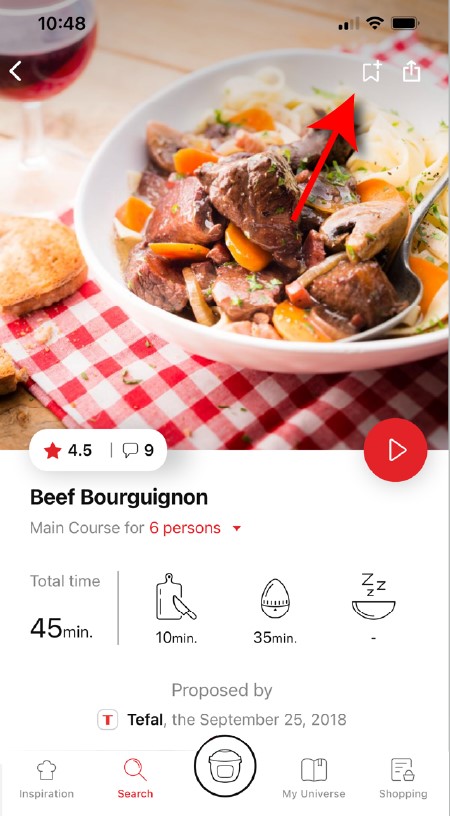
• Go to the recipe you wish to bookmark and select the bookmark logo in the top right corner.
highlighting the bookmark function in the Companion app
• A "My Notebooks" tab appears: select the "My Favorites" location.
• The recipe has been added.
You need to create an account and sign in to the application in order to access this feature.
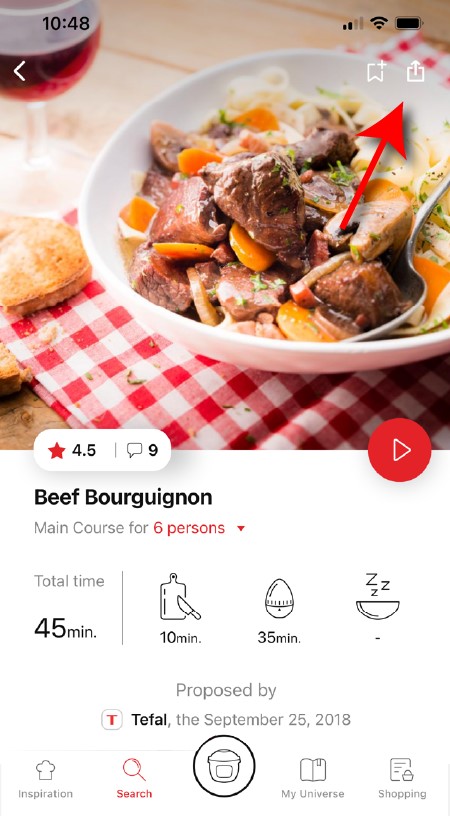
Click the sharing logo to view the sharing options.
highlighting the sharing functionality in the Companion app
You can then choose how you would like to share this recipe.
The application has rich content and requires a stable Wi-Fi connection to download correctly.
If your application does not download correctly, delete it and try to download again when you have a more stable Wi-Fi connection.
During initial installation, the download may take several minutes while the application saves all the photos on your Smartphone or tablet.
Your application uses notifications to alert you at the end of cooking times using a beep.
If you want to turn off this signal, simply deactivate it in your tablet or Smartphone.
You may also disable sounds in the parameter settings for notifications on your telephone or tablet.
Your application uses notifications to alert you when your cooking is finished but also to let you know when new content (information, recipe...) is available.
If you wish, you can disable them from your smartphone settings.
You can choose not to accept cookies.
However, the grey cookies banner will remain on your screen as long as you do not click on "accept".
Cookies are used for audience measurement and personalization to help us improve your use of the product.
Audience measurement solutions allow us to analyze traffic, trends, usage and identify malfunctions in order to improve your experience.

Personalization solutions allow us to improve the quality of the information and services we provide and make your experience more enjoyable.

You can accept or deny the use of cookies when you first launch your device.
You must create an account and log in to your app to access these features.

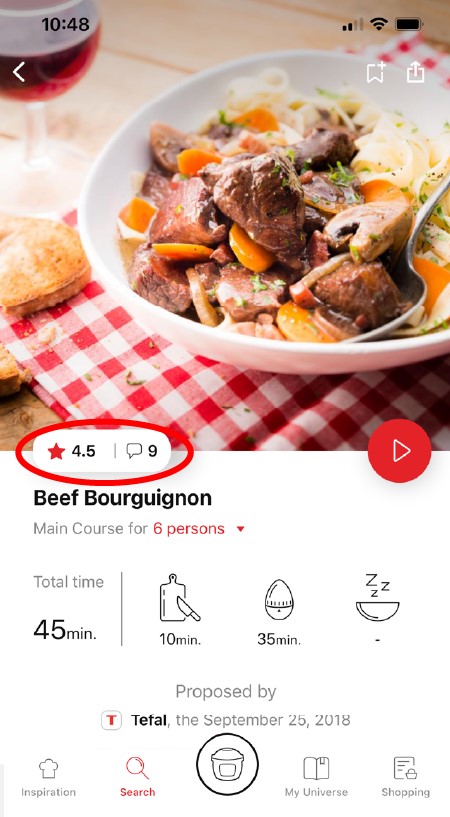
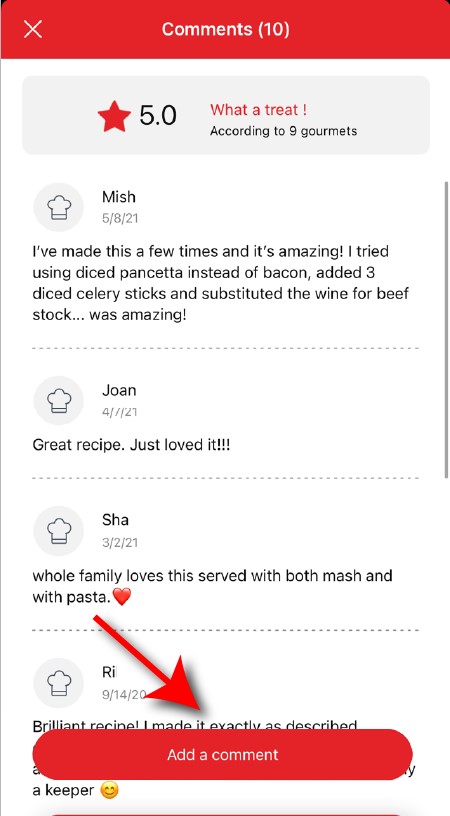
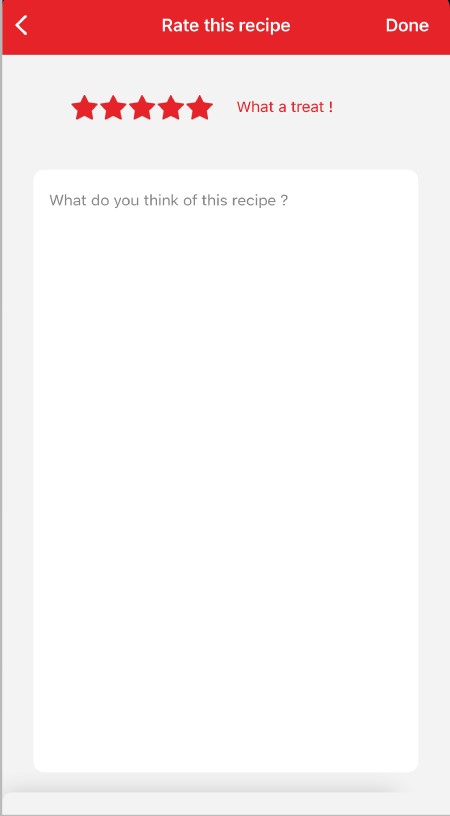
Once logged into your account, you will be able to rate the recipe and add a comment by following the instructions that appear on the screen after clicking on the notes/comments space.
highlighting rating feature from comments page in the Companion apprating page in the Companion app
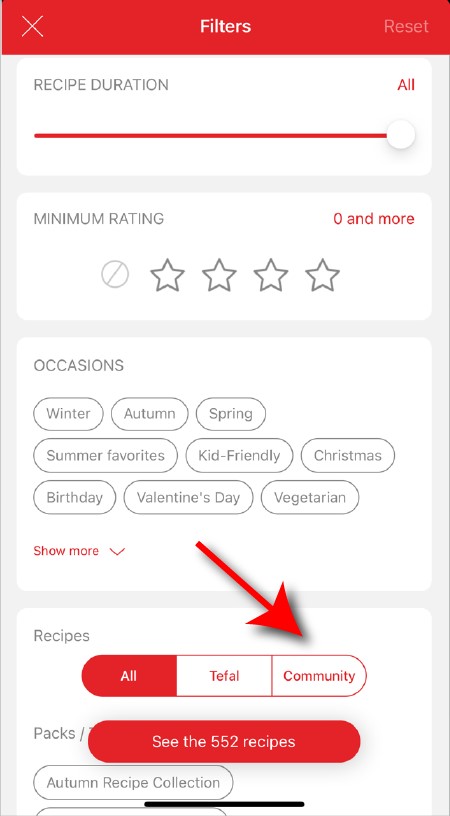
When using the search function, select "Filter recipes".
In the "Recipes" section, select "Community" only.
You will then be able to see the recipes from the community.
recipe filters page in the Companion app
Once you have completed your search, specific filters make it easier for you to find the recipes that meet your needs.

The customizable filter:
• Click on "Filter" in order to sort the recipes according to the type of dish (starter, main course, dessert), the time it takes to make the recipe, the minimum rating, their themes (or packs)...
• You can also choose to select only the recipes of the brand or the recipes proposed by the community.

Sorting recipes:
Once you have made a search, you can sort your recipes by popularity, rating, age or alphabetical order.
You must create an account and log in to your app to access these features.

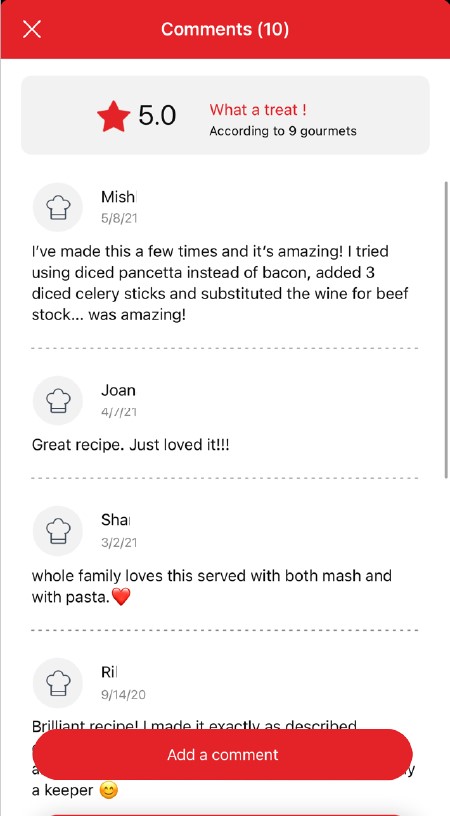
Once logged in, you will be able to read the comments and see the notes that community members have given to the recipe by clicking on the notes/comments area.
highlighting rating & comments feature from recipe page in the Companion appcomments page in the Companion app
You must create an account and log in to your app to access this feature.

• Choose the "My Universe" tab in the navigation bar.
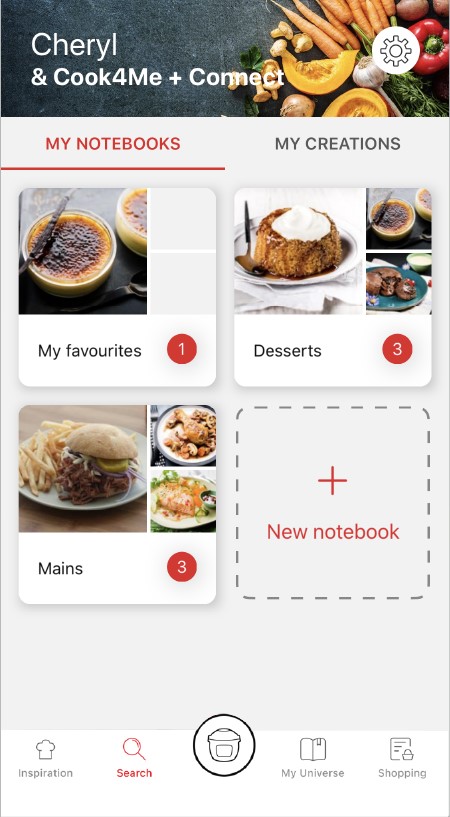
• There, you will find your recipe booklets and can create new ones by clicking on "New booklet".
recipes booklets page in the Companion app
Choose the "My Universe" tab in the navigation bar, then select the booklet you wish to modify or delete. Click on the pencil at the top right of the screen, then select the action you are looking for ("Delete booklet", "Rename booklet" or "Delete recipes").
It is important to select your product in the app in order to find the right recipes for that product. This way, the app will suggest hundreds of ideal recipes.
It will also let you add your accessories and access the associated recipes.
• In "My universe", select "My profile".
• Click on the image of the registered product.
• Click on "Remove the product". The app will then ask you to select a product.
此功能可讓您使用電機脈衝機制,製作碎冰或冷飲。
請務必先將液體食材倒入攪拌杯中,然後再加入固體食材。 請勿超過杯上標記的最大限制。
為取得最佳效果,在攪拌前應把食物切成2至3厘米長的立方體。
不可以,切勿把碗放進微波爐。
在首次使用前,我們建議您用熱肥皂水清洗攪拌機的所有配件,請小心,刀片十分鋒利。使用前亦可選擇清洗攪拌機身。
切碎器可用於香芹、蒜、洋蔥、麵包、堅果等。
每次使用「特強速度」功能2秒,整個過程最長3分鐘。
重新啟動前,暫停使用攪拌機15分鐘。
要清潔機身,先拔掉電源,然後用濕布擦拭。
要清潔碗身,請使用肥皂水或洗滌液。
部分碗適用於洗碗碟機,詳見使用說明。
此問題可能是由食材過多、又或者部分食材太大或太硬所致。 您可以嘗試減少食材配料的大小或數量,或先加入少許液體。

使用攪拌機時,請務必按指示蓋好蓋子或防護罩。
攪拌杯放到電機組件上之後,切勿將手伸入杯中。 如需將食材向下推,請使用抹刀等合適的工具。
電器置於不平穩的表面,或電器本身不穩。
食材過多,請減少份量。
如持續振動,請聯絡授權維修中心。
蓋子滲漏(溢出):
• 食材過多,請依照說明書指示,切勿超過碗身的最高水量刻度。
• 蓋子位置不正確,鎖好並固定於攪拌碗上。
如蓋子設有封口,請檢查封口狀況,並在有需要時更換。


碗底滲漏:
• 電器內沒有可拆式刀片組件:刀片組件的封口或已損壞,請交由授權維修中心進行檢查。
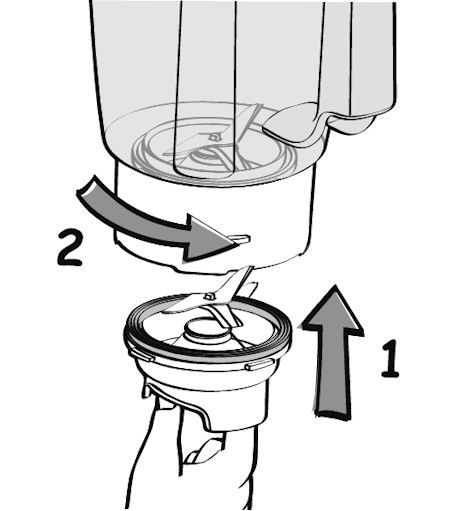
• 如電器內有可拆式刀片組件:請檢查組件是否正確置於內壺上。請確保刀片組件上的黑色凹口與壺底對應的凹槽完全接合,如果無誤,您將無法進一步轉動刀片組件,當倒置壺身,您亦無法看見壺身和刀片組件之間存有任何間隙。

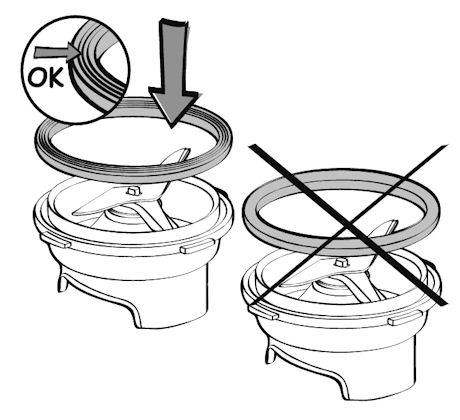
• 檢查墊圈/封口是否正確置於刀片組件外圍,完成後可見3層式墊圈/封口。如方向相反,您將無法在壺上鎖定刀片組件。

• 檢查墊圈/封口狀況,如有需要請更換。
• 檢查碗身是否因撞擊而裂開或破碎。

如滲漏情況持續,請把電器送交授權維修中心。
請勿使用電器。為避免發生危險,請將電器送返任何經批准的維修中心。
家電中含有可回收或可循環再用的材料。請將家電放置在公共垃圾收集點。
請瀏覽網站的「配件」頁面,輕鬆找尋所需產品。
請在此網站的保修部分找到更多詳細的資訊。
如認為有零件缺漏,請致電消費者服務中心,我們將協助您覓得合適的解決方案。