ULTRABLEND COOK BL962

ULTRABLEND COOK BL962 冷熱雙全 瞬間破壁

Tefal 養生烹煮機 ╴真正一機結合極速攪拌及烹煮功能,讓您盡享非一般的攪拌機功能,輕鬆為食材破壁,釋出豐富營養之餘,同時體驗更美味可口、幼滑口感的熱湯及凍飲。
想為自己、家人、孩子健康加分?備妥食材一按即可炮製營養豆漿、香濃魚湯、及嬰兒食品等,立刻成為養生專家及烹調高手。

參考編號: BL962B65

真正一機結合烹煮功能的極速攪拌機 冷熱雙全 瞬間破壁

必要元素
  • 獨有Tripl'Ax Pro革命性攪拌技術,瞬間破壁

    超凡Tripl'Ax Pro刀片技術,以專業級不銹鋼打造,比一般刀片堅硬耐用。擁有6葉刀片,向3個不同方位攪拌,達致最全面攪拌效果

  • 冷熱雙全

    除了普通攪拌外,是可以為你烹煮的極速攪拌機, 以精準火喉輕鬆炮製美味養生熱飲

  • 精準溫度控制

    溫度傳感器可精確探測食材溫度,控制烹調時間和火力,煮出營養香味。溫度傳感器亦令烹煮過程不易黏底,防止食物過熟或不熟,解決料理時間不準確的問題。

  • 8大預設模式 + 自動清洗功能 從頭到尾方便易用

    特設熱飲功能,如熱湯、五穀豆槳等,凍飲功能則有:奶昔、沙冰等。 每次用完,一按自動清洗鍵即可清洗,輕鬆打理。

  • 獨有優質耐溫玻璃杯

    特厚杯身以優質食物級破璃打造,耐用抗磨,800°C耐高溫、不釋出有害物質。同時可抗溫差達110°C,一熱一凍亦可抵禦

  • 1300瓦耐用摩打

    以每分鐘45,000轉極致速度,配合獨有Tripl'Ax Pro刀片技術,實現真正破壁,真正營養全釋放。

  • 數碼顯示屏,智能操作鍵

    容易使用,操作靈活

  • 安全頂蓋

    以安全扣穩固連接杯身,容易開合,無縫密封,防溢更安全,開蓋即停機。

  • 頂部小蓋

    防溢加料一舉兩得

  • default

    45,000轉極速摩打,極致發揮攪拌動力

    以每分鐘45,000轉極致速度,速度相等於460KM/H速度 大部分食材如魚骨都可於數分鐘內徹底粉碎。比一般攪拌機相比,口感更細滑15倍

特色
Main features
功率 1300  W
攪拌杯總容量 2  L
攪拌杯物料 玻璃  
Other features
可拆式刀片    
刀片數量 6  
顏色 灰色  
Suction feet for stability    
Programs 8種預設模式:湯、果醬、辣椒醬、糖漬水果、多穀物奶  
攪拌杯實用容量 1.75  L
碎冰功能    
速度設定 10  
指示及使用說明書
常見問題
The WiFi icon, especially visible from the home screen, indicates whether your product is connected or not.

WiFi icon crossed outThe product is not connected.
WiFi icon exclamation markThe product is connecting.
WiFi iconThe product is connected.
Your account, to be created from the app, allows you to benefit from additional services related to the interaction of your app with your product:
• Find the recipes saved in your notebooks and favourites directly on the robot's screen.
• Follow remotely the progress of the recipe on your product and receive recipe notifications.
• Display on your product a recipe that you have selected in the application.
Even if your product doesn't need a very fast WiFi connection to work, the received WiFi signal must still be stable.
If the screen displays a connectivity error, you can move the product closer to your box or add a WiFi repeater (see FAQ 'I don't have WiFi access in my kitchen').
If your product loses the WiFi connection during a recipe, you will be able to finish your recipe without any inconvenience.
However, the videos of that recipe will no longer be accessible until the connection is re-established.
If the WiFi connection is interrupted during an update, this cannot be completed. Your product will be able to reboot to its current version and this update will be rescheduled the next time you start it.
If your smartphone loses internet connection (WiFi or 4G) during a recipe it will have no impact on your product which will be able to execute the recipe without any problem. You will simply no longer be able to follow the progress of the recipe remotely on your smartphone and you will no longer receive notifications about the end of a step or the addition of an ingredient.
Your product can only be associated with one account.
However, any application that is connected to this account can interact with this product.
If you have a tablet and a smartphone, or if other members of your household want to interact with your product, they can simply connect their application using your account.
As soon as an update is available, your product when it connects to the WiFi will suggest you to do the update.


Some updates are priorities for security reasons and you will need to perform them before you can use your product.
Others may be delayed. You can then perform them now or later by going to your product's settings.
If an update fails, you can download it again.
If despite several attempts you are unable to install it, move the product closer to your box, the connection from your kitchen may be too weak to download it.
If the update fails even close to your box, please contact our customer service.
If your product is associated with your user account, you will be able to follow the progress of your recipe on your application.
You will also receive end-of-stage or alert notifications.
If you do not receive these notifications, please enable them in your iOS or Android settings.
To remotely send a recipe from your application to your product, simply open a recipe and click on the icon with your product.
If your product is on standby, it will open on your product as soon as it connects to Wifi.
If the product is running, it will be displayed in a few seconds if your product is not already making another recipe.
Place your device on a flat, stable surface.
To obtain an optimal connection between your device and your box, it is recommended to position your device in a place where the Wifi signal received from your box is strong. You can test the connection by positioning your smartphone at the location of your product to see if the WiFi signal received at that location is strong enough.
If the connection is interrupted (connection symbol crossed out), please bring your device and your box closer together to reestablish the connection.
The presence of the fixed connection indicator (application or product) ensures that your devices are connected.
裝置運行時,蓋子應保持在適當位置。
要在攪拌過程中添加材料,先取走食物口的塞蓋,再經蓋面的孔洞放進食材。
此功能可讓您使用電機脈衝機制,製作碎冰或冷飲。
請務必先將液體食材倒入攪拌杯中,然後再加入固體食材。 請勿超過杯上標記的最大限制。
為取得最佳效果,在攪拌前應把食物切成2至3厘米長的立方體。
不可以,切勿把碗放進微波爐。
在首次使用前,我們建議您用熱肥皂水清洗攪拌機的所有配件,請小心,刀片十分鋒利。使用前亦可選擇清洗攪拌機身。
切碎器可用於香芹、蒜、洋蔥、麵包、堅果等。
每次使用「特強速度」功能2秒,整個過程最長3分鐘。
重新啟動前,暫停使用攪拌機15分鐘。
On the home page, drag the menu to the right and select "Stand by".
Thanks to the function "In my fridge" you can indicate the ingredients that you have at your disposal and we will suggest suitable recipes.


• You can access this feature from the home screen.
• Add one or two ingredients by typing their name in the search bar and selecting it from the suggestions.
• You can then enter the weight of the added ingredients so that we can offer you recipes for those quantities.
加熱系統採用燈絲加熱電阻器來控制溫度,而非使用電磁感應加熱系統。
本公司的電器保證遵守法國 / 歐洲對無線電頻率放射的安全規定,亦符合人體接觸電磁場的限制規定。
電器皆搭載安全接地系統,因此務必要使用接地插座連接電源。
若裝有心律調節器,切記採取必要的預防措施。
要清潔機身,先拔掉電源,然後用濕布擦拭。
要清潔碗身,請使用肥皂水或洗滌液。
部分碗適用於洗碗碟機,詳見使用說明。
此問題可能是由食材過多、又或者部分食材太大或太硬所致。 您可以嘗試減少食材配料的大小或數量,或先加入少許液體。

使用攪拌機時,請務必按指示蓋好蓋子或防護罩。
攪拌杯放到電機組件上之後,切勿將手伸入杯中。 如需將食材向下推,請使用抹刀等合適的工具。
電器置於不平穩的表面,或電器本身不穩。
食材過多,請減少份量。
如持續振動,請聯絡授權維修中心。
蓋子滲漏(溢出):
• 食材過多,請依照說明書指示,切勿超過碗身的最高水量刻度。
• 蓋子位置不正確,鎖好並固定於攪拌碗上。
如蓋子設有封口,請檢查封口狀況,並在有需要時更換。


碗底滲漏:
• 電器內沒有可拆式刀片組件:刀片組件的封口或已損壞,請交由授權維修中心進行檢查。
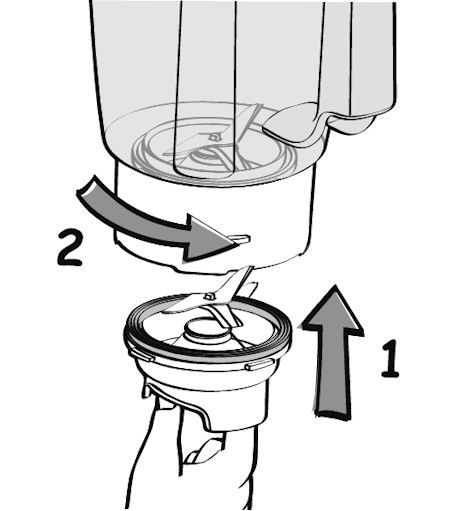
• 如電器內有可拆式刀片組件:請檢查組件是否正確置於內壺上。請確保刀片組件上的黑色凹口與壺底對應的凹槽完全接合,如果無誤,您將無法進一步轉動刀片組件,當倒置壺身,您亦無法看見壺身和刀片組件之間存有任何間隙。

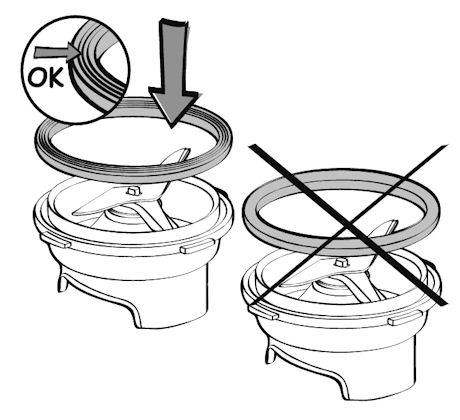
• 檢查墊圈/封口是否正確置於刀片組件外圍,完成後可見3層式墊圈/封口。如方向相反,您將無法在壺上鎖定刀片組件。

• 檢查墊圈/封口狀況,如有需要請更換。
• 檢查碗身是否因撞擊而裂開或破碎。

如滲漏情況持續,請把電器送交授權維修中心。
Please check the WiFi icon on your product.

WiFi icon crossed out
Your product is not connected to the WiFi (via the modem or via a mobile phone).
Therefore, you can only access the 250 recipes contained in your product.
We advise you to check that WiFi is activated on your modem/phone and to get closer to your modem/phone.
We remind you that your product cannot connect to a 5GHz WiFi network, a WiFi network with a password containing special characters, as well as open WiFi networks (which do not require a password).

WiFi icon exclamation mark
Your product is connected to the WiFi (via modem, mobile phone,...), but not connected to the database.
Therefore, you can only access the 250 recipes contained in your product.

WiFi icon
Your product is connected to the WiFi (via modem, mobile phone,...) and to the database. As a result, you can access more than 1,500 recipes.
家電中含有可回收或可循環再用的材料。請將家電放置在公共垃圾收集點。
請瀏覽網站的「配件」頁面,輕鬆找尋所需產品。
請在此網站的保修部分找到更多詳細的資訊。
如認為有零件缺漏,請致電消費者服務中心,我們將協助您覓得合適的解決方案。